

Your plan says 50 Mbps. Netflix says 15. Your next game download says four hours. None of those numbers speak the same language, which is how people end up paying for speed they will never notice.
Most people asking is 50 Mbps fast are really asking whether it will cope with their house. It is a moderate speed. One or two people can stream, video call and game on it at once without trouble, and it gets tight once a third or fourth heavy user joins in. Every speed figure below is published by Netflix, YouTube, Zoom or the FCC, or worked out from plain arithmetic. Here it is broken down activity by activity, with the point where paying more starts to pay off.
Quick Answer: 50 Mbps is a moderate internet speed. It covers one or two people browsing, video calling and gaming casually, and it carries up to three 4K streams at Netflix’s 15 Mbps each when nothing else is running. It struggles in busy homes, with big game downloads and with upload-heavy work, and it downloads at about 6.25 MB/s.
Is 50 Mbps Fast or Slow?
Moderate. It is comfortable for a small household and slow for a busy one, and that single sentence covers most of what people want to know.
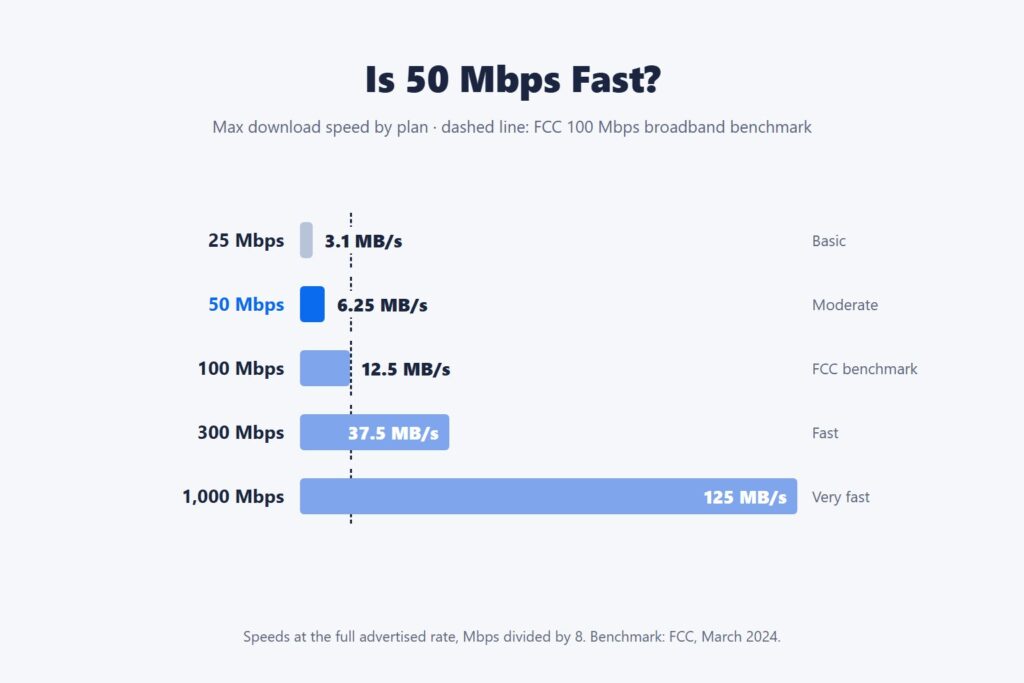
For context, 50 Mbps is half of what the US government now counts as high-speed broadband. The FCC raised its broadband benchmark to 100 Mbps download and 20 Mbps upload on 14 March 2024, in a report adopted under Chairwoman Rosenworcel. The Federal Communications Commission said the move was “a four-fold increase from the 25/3 Mbps benchmark set by the Commission in 2015”, basing it on “consumer usage patterns, and what is actually available from and marketed by internet service providers.” The agency revisited that decision in its August 2026 broadband report and kept 100/20 in place, so the bar has not moved. That makes 50 Mbps a real, usable connection that no longer clears the federal line: entry-level by today’s standards rather than genuinely slow.
Download speed is also only one of three numbers that decide how a connection feels. Latency, the delay before data starts moving, affects calls and gaming far more than bandwidth does, and your upload speed is the third.
How Fast Is 50 Mbps in MB Per Second?
About 6.25 MB per second at the full advertised speed.
The arithmetic is simple once you know the catch: internet speeds are sold in megabits, file sizes are stored in megabytes, and there are eight bits in a byte. So 50 Mbps divided by 8 gives 6.25 MB/s. Treat that as the ceiling rather than a promise.
At that rate, a 1 GB file lands in roughly 2 minutes 40 seconds, and an hour of flat-out downloading moves about 22.5 GB. Real transfers come in slower, because servers limit their own speeds, Wi-Fi loses signal across a house and other devices take their share.
What Can 50 Mbps Handle Well?

For one or two people, 50 Mbps covers nearly everything a normal day involves. Here is where it has room to spare, with the bandwidth each activity actually needs.
Browsing, Email and Social Media for 1-2 People
What it needs: Under 1 Mbps for most of it. Web pages, email and scrolling a feed move small bursts of data and then go quiet.
What 50 Mbps gives you: So much headroom that these tasks never register. Two people browsing at the same time use a fraction of the line, leaving well over 45 Mbps free for whatever else is running.
HD and 4K Streaming
What it needs: Netflix recommends 5 Mbps for 1080p and 15 Mbps for 4K. YouTube asks for a little more at the top end: 5 Mbps for 1080p and 20 Mbps for 4K.
What 50 Mbps gives you: One 4K stream with about 35 Mbps to spare, or several HD streams at once with room for background use. Three Netflix 4K streams is the theoretical maximum at 45 Mbps, which leaves roughly 5 Mbps for everything else.
Smart TVs are the usual worry here, and they are fine: a smart TV pulling Netflix in 4K needs the same 15 Mbps as any other device. If your picture drops to HD on busy evenings, the real 4K vs 1080p difference is smaller than the spec sheet suggests at normal sofa distances. On a flagship panel like the Sony BRAVIA 9, that full 15 Mbps is what keeps 4K looking like 4K.
Video Calls and Remote Work
What it needs: Less than most people assume. Zoom’s system requirements list 3.8 Mbps up and 3.0 Mbps down for 1080p group video, and 2.6 Mbps up and 1.8 Mbps down for 720p group video.
What 50 Mbps gives you: Room for several calls at once on the download side, provided latency stays low. Keep ping under about 50 ms and calls feel immediate.
Regulars in Quora remote-work threads push back hard on the speed obsession: their repeated point is that low latency and stable jitter decide call quality far more than raw bandwidth, and that upgrading will not fix lag if you were never maxing out your line. One r/techsupport poster described two adults working remotely on 50 Mbps with a child on Zoom at the same time. Hardware counts too: across the HP EliteBook vs ProBook ranges, the better Wi-Fi radio and microphone do more for a call than another 50 Mbps ever would.
Casual Online Gaming
What it needs: Almost nothing. Live gameplay sends small, frequent packets, typically under 1 Mbps per player.
What 50 Mbps gives you: Far more than everyone in the house needs to play at once. The ceiling here is ping, not bandwidth.
Gaming threads on r/techsupport are blunt about this. In one long discussion about two people gaming simultaneously, the top reply argued you could put 100 people online on 50 Mb without issue, and that the trouble only starts when somebody begins a download.
Where Does 50 Mbps Struggle?
It runs out of room in two places: when several people make heavy demands at the same moment, and when files are large.
Large Households and Many Devices
Several HD and 4K streams at once will fill the line, and smart-home kit adds to the load in the background. Security cameras uploading clips, speakers pulling firmware updates and a robot vacuum reporting home all draw from the same 50 Mbps.
The arithmetic turns unforgiving fast. Three Netflix 4K streams at 15 Mbps each is 45 Mbps. Add one 1080p Zoom call at roughly 4 Mbps and you are at about 49 Mbps with nothing in reserve. At that point, the next person to open anything causes buffering somewhere in the house.
Big Game and Software Downloads
Downloads are where you feel the difference against a faster plan, every single time.
A 50 GB game takes about 2 hours 13 minutes at a full 50 Mbps. The same download finishes in about 1 hour 7 minutes on a 100 Mbps plan and about 22 minutes on 300 Mbps. Console and PC patches now land weekly at 10 to 30 GB a time, so the waiting accumulates across a year. Starting a large download while somebody else is streaming makes both slower, and that collision is the real cost.
Upload-Heavy Tasks
Upload is the number almost nobody checks, and it usually runs far below the download figure.
Cloud backups, sending large video files and live streaming to Twitch or YouTube all depend on it. A cable plan advertised at 50 Mbps down might upload at 5 or 10 Mbps, which turns a 20 GB backup into an overnight job. Fiber plans are far more likely to offer matching speeds in both directions.
Check your plan’s upload figure before blaming the download speed. Any speed test will show it.
Is 50 Mbps Fast Enough for Gaming?
Yes for playing, no for downloading quickly. Those are two different demands, and 50 Mbps handles them very differently.
Live gameplay barely touches your bandwidth. Valorant, Fortnite, Call of Duty and console multiplayer all send tiny packets many times a second, and what ruins a match is ping, packet loss or jitter, never a shortage of megabits. A 50 Mbps fiber line running at 15 ms will beat a 300 Mbps connection running at 80 ms every time.
Two changes improve gaming on 50 Mbps more than any plan upgrade:
- Run Ethernet to the machine you game on. Wi-Fi adds latency and variability that extra speed cannot fix.
- Keep large downloads off the line while you play. A single background update is enough to spike your ping.
Downloads are the genuine limitation. That 50 GB install takes about 2 hours 13 minutes, and if you buy games often or play on a console that patches constantly, that wait is the strongest argument for 100 Mbps.
For gaming on the TV itself, panel response and input lag decide far more than your plan does, which is exactly where the QNED vs OLED differences show up.
How Many Devices Can Use 50 Mbps at Once?

Comfortably one or two heavy users, plus as many light devices as you like. Device count alone tells you little, because a smart bulb and a 4K TV are nowhere near the same demand. What counts is the total being pulled at one moment, so here is how common households add up, using Netflix’s 15 Mbps for 4K, 5 Mbps for HD and about 4 Mbps for a 1080p Zoom call.
| Household | What is running | Estimated use | Fits on 50 Mbps? |
|---|---|---|---|
| 1 person | One 4K stream plus browsing | About 16 Mbps | Yes, lots of room |
| 2 people | Two 4K streams plus a Zoom call | About 34 Mbps | Yes |
| 3 people | Two 4K streams, one HD stream, a Zoom call | About 39 Mbps | Yes, little spare |
| 4 people | Three 4K streams plus a Zoom call | About 49 Mbps | Full, no reserve |
| 5 users | Three 4K streams, a Zoom call, a game download | Over 50 Mbps | No, expect buffering |
All figures at the full advertised speed. Real speeds run lower.
That last row explains why r/techsupport regulars answering a family-of-four question landed on 100 Mbps as the sensible minimum, and why a separate thread about three people who all stream drew a one-line reply: if you stream, no.
50 Mbps vs 100 Mbps and Faster Plans
100 Mbps doubles your download speed, meets the FCC benchmark and makes sense for three or more people or for anyone pulling large files regularly. Below that threshold, the upgrade often goes unnoticed.
| Plan speed | Max download | 1 GB file | 50 GB game | 4K Netflix streams at 15 Mbps each |
|---|---|---|---|---|
| 25 Mbps | 3.1 MB/s | 5 min 20 s | 4 h 27 min | 1 |
| 50 Mbps | 6.25 MB/s | 2 min 40 s | 2 h 13 min | 3 |
| 100 Mbps | 12.5 MB/s | 1 min 20 s | 1 h 7 min | 6 |
| 300 Mbps | 37.5 MB/s | 27 s | 22 min | 20 |
| 1,000 Mbps | 125 MB/s | 8 s | 6 min 40 s | 66 |
All figures at the full advertised speed, calculated as Mbps divided by 8. The stream column is pure bandwidth arithmetic: other devices, Wi-Fi losses and peak-hour slowdowns push the real number well below it.
Moving from 25 to 50 Mbps transforms a household, and 50 to 100 halves your download waits. Past 300 Mbps the returns thin out quickly, because almost nothing a normal home does can absorb that much at one time.
Quora threads on this exact question are instructive before you phone your provider. One heavily answered post came from someone who moved from 50 to 100 Mbps, then went back to 50, and noticed no difference at all. The replies kept making the same point: if you were never maxing out 50 Mbps, doubling it changes nothing you can perceive.
Is 50 Mbps Fast Enough for Your Home?
Yes for one or two people, no for three or more heavy users. Three questions tell you which side you are on.
- How many people are online at the same time? One or two, and 50 Mbps is comfortable. Three or more, and you are budgeting bandwidth.
- What are they actually doing? 4K streaming, remote work and large downloads are the heavy ones. Browsing, music and HD video barely register.
- How often do you download big files? Weekly game patches or large work files are the clearest reason to pay for more.
The rule of thumb: One or two people with light to moderate use should stay on 50 Mbps and spend the saving elsewhere. Three or more heavy users, or anyone regularly downloading 50 GB games, will feel 100 Mbps immediately.
One more thing people forget: if your connection already feels slow with only two people on it, your router or Wi-Fi coverage is the likelier culprit, and a faster plan will not fix either.
Why Does My 50 Mbps Feel Slower?
Usually because you are not receiving 50 Mbps where you are using it. The figure on your bill is measured where the line enters your home, not at your laptop on the sofa.
Four things take the blame most often:
- Wi-Fi distance and walls. Signal drops sharply through brick, concrete and floors, so a device two rooms away might see half the speed.
- An older router. Hardware running Wi-Fi 4 or early Wi-Fi 5 can cap your throughput well below what your plan delivers.
- Peak-hour congestion. Cable connections share local capacity, so evenings run slower than mornings.
- Background updates. Phones, consoles and PCs fetch patches on their own schedule, often at the worst moment.
The fixes, in order of effect: Run Ethernet to the devices you game or work on, move the router out of a cupboard and into open space, then run a speed test at two different times of day to see whether the problem is your line or your house.
Final Verdict
50 Mbps is good value for one or two people and a bottleneck for a full house.
If you live alone or with one other person, stream in HD or 4K, work from home and game casually, stay where you are. You will notice the saving more than you would notice the speed. If three or more of you are online at once, or somebody downloads 50 GB games most weeks, or you upload video for a living, 100 Mbps is the upgrade that earns its price.
Before paying more, check your upload figure and your router. Those two fix more complaints than a bigger plan does.
A newer router or a mesh kit is usually the cheaper fix, and the Electronics Guide comparisons at Best Electronics Guide weigh those options side by side.
Frequently Asked Questions
How Many Devices Can Use 50 Mbps?
Dozens on light tasks, since phones and smart-home kit draw almost nothing. Heavy use is the real limit: one or two people streaming or working, or around three 4K streams in total at Netflix’s 15 Mbps each, before the connection is fully committed.
Is 50 Mbps Fast Enough for Netflix?
Yes, comfortably. Netflix recommends 5 Mbps for 1080p and 15 Mbps for 4K, so a 50 Mbps line carries a single 4K stream with roughly 35 Mbps spare, or three 4K streams at once if nothing else on the network is running.
Is 100 Mbps Slow for WiFi?
No. It meets the FCC’s 100/20 Mbps broadband benchmark and carries around six simultaneous 4K Netflix streams. If Wi-Fi feels slow on a 100 Mbps plan, the router, its placement or the device’s wireless hardware is the likelier cause.
How Many GB Are in 50 Mbps?
None directly, because Mbps measures speed while GB measures volume. At a full 50 Mbps you move about 6.25 MB every second, which works out to roughly 22.5 GB in an hour. A 1 GB file finishes in about 2 minutes 40 seconds.
Is 50 Mbps Enough for 4 People?
Yes if most of that use is browsing, social media and HD video. No if all four stream 4K, game and take video calls simultaneously, which totals close to 50 Mbps on its own and leaves nothing spare for background downloads.
Is 50 Mbps Upload Fast?
Yes, a 50 Mbps upload is generous, covering live streaming, large cloud backups and video calls at the same time. Most plans advertising 50 Mbps download upload far slower, often 5 to 10 Mbps, so check the second number on your bill.